
Running a Small Business? Here’s Why the Right Software Matters
Managing a small business today is about much more than selling products or services. On any given day, you might be responding to customer enquiries, creating GST invoices, checking stock levels, following up on pending payments, and reviewing sales performance. Handling all these tasks manually—or using different software for each one—can quickly become confusing and time-consuming.
Many business owners start with spreadsheets, paper records, or separate applications for billing and customer management. While this may work in the beginning, it often leads to duplicate data, billing mistakes, missed follow-ups, and unnecessary delays as the business grows.
That’s exactly why more businesses are investing in the Best CRM and Billing Software for Small Businesses in 2026.
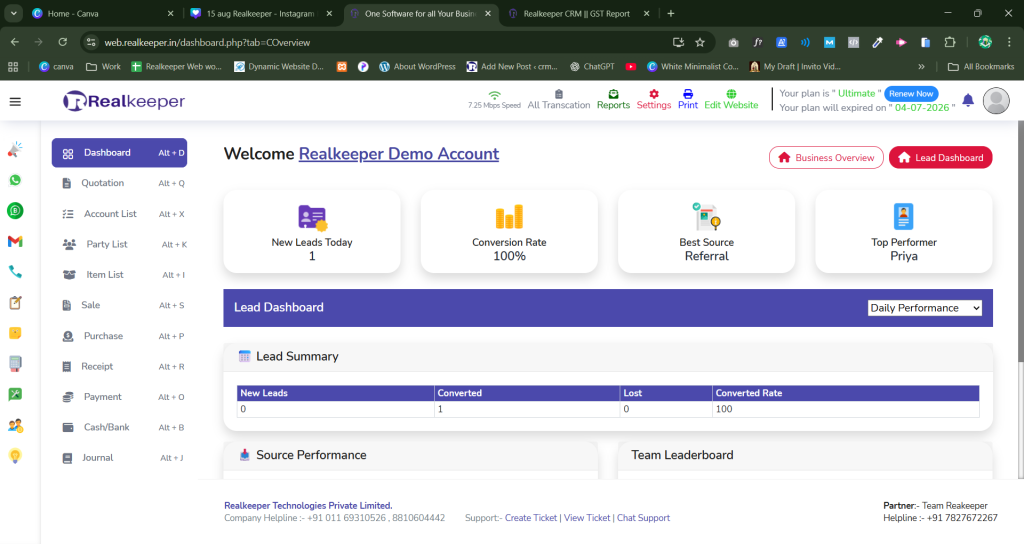
A modern CRM and billing solution brings everything together in one place. From managing customer relationships and generating GST-compliant invoices to tracking inventory, monitoring payments, and analyzing business performance, every important task can be handled from a single dashboard.
Whether you own a retail shop, wholesale business, manufacturing unit, service agency, startup, or distribution company, the right software helps you save time, improve customer service, and make smarter business decisions without increasing your workload.
One solution that stands out for Indian businesses is RealKeeper CRM Software. It combines CRM, GST billing, inventory management, accounting, sales tracking, and business reporting into one cloud-based platform, making day-to-day operations much simpler.
In this guide, you’ll learn:
- What CRM and billing software is
- Why small businesses need it in 2026
- The features you should never compromise on
- How it improves productivity and customer satisfaction
- How to choose the right software for your business
- Why RealKeeper can be a smart long-term investment
By the end of this article, you’ll have a clear understanding of how the right business management software can help you work more efficiently and grow with confidence.
Key Takeaways
Before diving into the details, here are the most important points you’ll learn from this guide:
- The Best CRM and Billing Software for Small Businesses combines CRM, GST billing, inventory, accounting, and sales management in one platform.
- Cloud-based software lets you access your business data securely from anywhere.
- Automated GST billing saves time and reduces manual errors.
- Real-time inventory tracking helps avoid stock shortages and overstocking.
- Integrated reports provide valuable insights for smarter business decisions.
- Choosing scalable software today can support your business as it grows in the future.
Table of Contents
- What is CRM and Billing Software?
- What is Customer Relationship Management (CRM) Software?
- What is Billing Software?
- Why Small Businesses Need CRM and Billing Software in 2026
- Top Features to Look For
- Benefits of CRM and Billing Software
- CRM vs Traditional Billing System
- Cloud CRM vs Desktop CRM
- Best CRM Software Comparison
- Industries That Benefit the Most
- Why Choose RealKeeper CRM Software
- Buying Guide
- Future Trends
- Frequently Asked Questions
- Conclusion
What is CRM and Billing Software?
CRM and Billing Software is an all-in-one business solution that helps companies manage customer relationships while handling billing, inventory, accounting, sales, and financial operations from a single platform.
Instead of switching between multiple applications, businesses can keep all their important information in one place. This not only saves time but also reduces errors and improves team collaboration.
Think of it this way: imagine a customer places an order, requests a GST invoice, and later contacts your team for support. With an integrated CRM and billing system, every detail—from the first enquiry to the final payment—is stored in one place. Your team doesn’t have to search through emails, spreadsheets, or different software to find the information they need.
This centralized approach makes daily operations smoother and helps businesses deliver a better customer experience.
As businesses grow, managing customers and finances separately becomes increasingly difficult. That’s why many companies now prefer integrated business management software that combines CRM, billing, inventory, and accounting into one easy-to-use platform.
What is Customer Relationship Management (CRM) Software?
Customer Relationship Management (CRM) software is designed to help businesses organize and manage every interaction they have with customers.
Instead of keeping customer details in notebooks or Excel sheets, a CRM stores everything in one secure database. From the first enquiry to repeat purchases, every interaction is recorded, making it easier for sales and support teams to provide better service.
For example, imagine a customer asks for a quotation today but decides to buy after two weeks. Without a CRM, there’s a good chance someone may forget to follow up. A CRM automatically reminds your sales team at the right time, increasing the chances of converting that enquiry into a sale.
A good CRM usually includes features such as:
- Lead Management
- Customer Database
- Contact Management
- Sales Pipeline Tracking
- Follow-up Reminders
- Task Management
- Communication History
- Team Collaboration
- Mobile Access
- Sales Reports
For businesses that deal with hundreds of customers every month, these features make a noticeable difference. Instead of spending time searching for information, employees can focus on building stronger customer relationships and closing more sales.
Cloud-based CRM software also allows teams to access customer information securely from anywhere, making it ideal for businesses with multiple branches or remote employees.
What is Billing Software?
Billing software helps businesses create invoices, calculate taxes, record payments, and maintain financial records quickly and accurately.
Instead of preparing invoices manually, businesses can generate professional GST-compliant invoices within seconds. This not only saves time but also reduces the chances of calculation errors.
A modern billing solution generally includes features like:
- GST Invoice Generation
- Quotation Management
- Purchase Bills
- Credit Notes
- Debit Notes
- Payment Tracking
- Expense Recording
- Online Payment Support
- Invoice Printing and Sharing
Let’s say you run an electronics store and serve dozens of customers every day. Manually calculating GST and preparing invoices for every sale can be both slow and error-prone. Billing software automates the entire process, allowing your staff to create accurate invoices in just a few clicks.
For Indian businesses, GST compliance is essential. Reliable GST billing software automatically calculates taxes according to the applicable GST rates, helping businesses stay compliant while simplifying tax filing.
Why Small Businesses Need CRM and Billing Software in 2026
The way businesses operate has changed dramatically over the last few years. Customers expect quick responses, accurate billing, personalized communication, and a smooth buying experience. At the same time, business owners need better visibility into sales, inventory, and finances to stay competitive.
Trying to manage all of this manually often results in missed follow-ups, billing mistakes, inventory issues, and unnecessary stress.
That’s why more companies are choosing the Best CRM and Billing Software for Small Businesses.
Here are some of the biggest reasons why:
1. Build Stronger Customer Relationships
Keeping customer information in one place makes it easier to understand buying behaviour, respond quickly, and provide personalized service. Better customer relationships often lead to repeat business and higher customer loyalty.
2. Create GST Invoices Faster
Manual billing takes time and increases the chances of mistakes. With automated GST billing, invoices are generated quickly and accurately, allowing businesses to serve customers more efficiently.
3. Improve Sales Performance
A CRM helps your sales team keep track of leads, follow-ups, quotations, and customer conversations. Instead of letting opportunities slip away, your team can focus on converting more enquiries into paying customers.
4. Manage Everything from One Dashboard
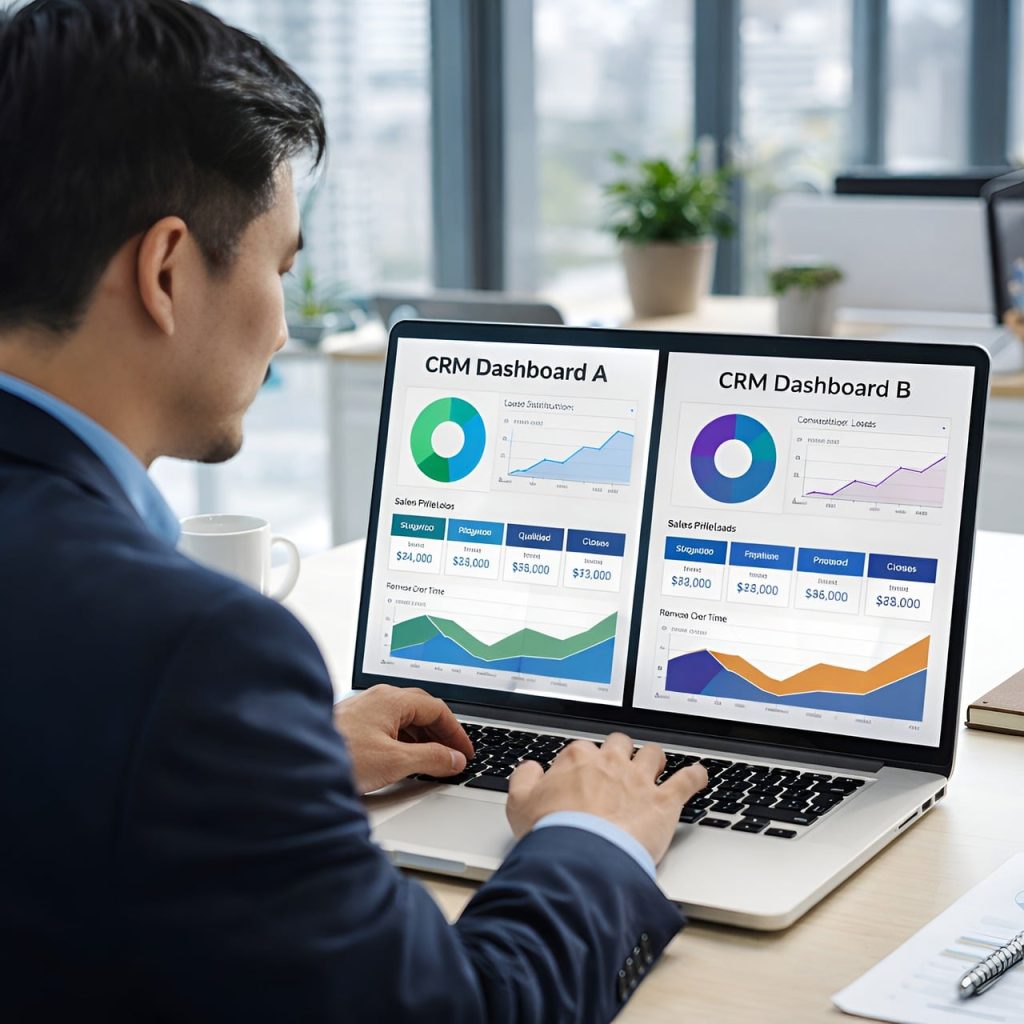
Using separate software for CRM, billing, inventory, and accounting often creates duplicate work. An integrated solution keeps everything connected, making daily operations much easier to manage.
5. Maintain Better Cash Flow
Late payments can slow down business growth. Billing software helps track outstanding invoices, send payment reminders, and monitor collections so that you always have a clear picture of your cash flow.
6. Track Inventory in Real Time
For businesses selling physical products, accurate inventory management is crucial. Every sale and purchase automatically updates stock levels, helping prevent both stock shortages and excess inventory.
7. Work from Anywhere
Cloud-based CRM software allows business owners and employees to securely access important business data from a laptop, tablet, or smartphone. Whether you’re in the office, meeting clients, or travelling, your business stays connected.
8. Make Better Business Decisions
Instead of relying on guesswork, modern CRM and billing software provides real-time reports on sales, revenue, customer activity, and inventory performance. These insights help business owners identify opportunities and make informed decisions with confidence.
Top Features to Look for in the Best CRM and Billing Software for Small Businesses
Not every CRM and billing software offers the same value. Some tools are great for invoicing but lack customer management, while others focus on CRM but don’t provide inventory or accounting features.
The Best CRM and Billing Software for Small Businesses should help you manage your entire business from one platform instead of making you switch between multiple applications.
Here are the features you should look for before investing in any software.
1. Customer Relationship Management (CRM)
Your customers are the foundation of your business, and maintaining strong relationships with them is essential for long-term growth.
A good CRM keeps every customer detail organized in one place, including contact information, previous purchases, conversations, quotations, and follow-up reminders.
Imagine a customer contacted you three months ago but didn’t make a purchase. Instead of losing that opportunity, the CRM reminds your sales team to reconnect at the right time. A simple follow-up can often turn an old enquiry into a new sale.
Key Benefits
- Store complete customer information securely
- Track communication history
- Schedule follow-ups automatically
- Improve customer satisfaction
- Increase repeat business
2. Lead Management
Every enquiry is a potential customer. Whether someone contacts you through your website, WhatsApp, Facebook, Instagram, Google Ads, or a phone call, a CRM should capture and organize those leads automatically.
Without proper lead management, enquiries can easily be forgotten, especially during busy periods.
With an integrated CRM, you can assign leads to team members, track their progress, and see exactly where each prospect is in the sales process.
A good Lead Management system should allow you to:
- Capture leads from multiple sources
- Assign leads to employees
- Schedule reminders
- Track follow-ups
- Measure conversion rates
This ensures that no sales opportunity slips through the cracks.
3. GST Billing Software
Billing is one of the most important parts of any business. Customers expect accurate invoices, while businesses need to remain GST compliant.
Instead of preparing invoices manually, modern GST billing software creates professional invoices within seconds and automatically calculates taxes.
Most quality billing software allows you to generate:
- GST Tax Invoices
- Quotations
- Proforma Invoices
- Purchase Bills
- Credit Notes
- Debit Notes
- Delivery Challans
Why it matters
Manual billing increases the chances of calculation mistakes and consumes valuable time. Automated GST billing improves accuracy, speeds up the billing process, and makes tax filing much easier.
4. Inventory Management
If your business sells physical products, inventory management is just as important as billing.
Keeping track of stock manually often leads to overstocking, stock shortages, or inaccurate inventory records.
An integrated inventory management system updates stock automatically whenever a purchase or sale is recorded.
For example, if a customer purchases 20 products, the available stock is updated instantly without requiring manual changes.
Important inventory features include:
- Real-time stock tracking
- Low stock alerts
- Barcode support
- Warehouse management
- Product categorization
- Purchase management
This helps businesses maintain better inventory control and avoid unnecessary losses.
5. Sales Management
Growing businesses need complete visibility into their sales activities.
Instead of relying on spreadsheets or handwritten records, a sales management system provides a clear picture of every stage in the sales process.
You can easily monitor:
- Active leads
- Pending quotations
- Sales orders
- Employee performance
- Monthly sales trends
- Best-selling products
Having access to this information helps business owners identify opportunities, improve team performance, and increase revenue.
6. Payment Tracking
One of the biggest challenges for many small businesses is delayed payments.
When invoices are scattered across different systems or maintained manually, it’s easy to lose track of who has paid and who hasn’t.
A good CRM and billing software lets you monitor:
- Paid invoices
- Pending invoices
- Partial payments
- Credit customers
- Payment due dates
Some software even sends automatic payment reminders, helping businesses improve cash flow without constantly following up manually.
7. Cloud-Based Access
Modern businesses are no longer limited to working from one office.
Cloud-based CRM software gives you the flexibility to access important business information from anywhere using a laptop, tablet, or smartphone.
Whether you’re travelling, meeting clients, or working remotely, your data remains secure and available in real time.
Advantages of cloud software include:
- Remote access
- Automatic backups
- Secure cloud storage
- Multi-device support
- Automatic software updates
For growing businesses, cloud solutions are usually more flexible than traditional desktop software.
8. Reports and Analytics
Making business decisions based on guesswork can be risky.
A good CRM and billing software provides detailed reports that help you understand what’s happening in your business.
You can generate reports for:
- Sales performance
- Customer activity
- GST
- Inventory
- Purchases
- Outstanding payments
- Profit and Loss
Instead of spending hours preparing reports manually, business owners can view real-time insights with just a few clicks.
9. Multi-User Access
As your business grows, more employees need access to business information.
A multi-user system allows you to create separate accounts for different team members while controlling what each person can access.
For example:
- Sales executives can manage leads.
- Accountants can handle billing and payments.
- Store managers can monitor inventory.
- Business owners can access complete reports.
This improves collaboration without compromising data security.
10. Mobile Accessibility
Business doesn’t stop when you’re away from your office.
A mobile-friendly CRM allows you to:
- Create invoices
- Check customer details
- View pending payments
- Monitor sales
- Track inventory
- Access reports
Having these features available on your smartphone means you can stay connected to your business wherever you are.
Benefits of Using CRM and Billing Software
Implementing the Best CRM and Billing Software for Small Businesses isn’t just about replacing manual work. It’s about making your entire business more organized, efficient, and ready for growth.
Here are some of the biggest advantages.
Save Time Every Day
Tasks like creating invoices, updating customer records, checking stock, and tracking payments can take hours when done manually.
Automation handles these repetitive activities in seconds, giving you more time to focus on serving customers and growing your business.
Deliver Better Customer Service
Customers appreciate quick responses and personalized service.
When all customer information is stored in one place, your team can answer questions faster, remember previous conversations, and provide a smoother experience.
Happy customers are more likely to return—and recommend your business to others.
Reduce Costly Mistakes
Manual processes often lead to duplicate entries, incorrect invoices, and stock mismatches.
An integrated CRM and billing solution minimizes these errors through automation, improving both accuracy and efficiency.
Increase Sales Opportunities
Every missed follow-up is a missed opportunity.
A CRM helps your sales team keep track of leads, schedule reminders, and follow up at the right time.
The result? Better conversion rates and more revenue.
Improve Financial Visibility
Understanding your business finances shouldn’t require searching through multiple spreadsheets.
With integrated reports, you can monitor:
- Revenue
- Expenses
- Outstanding payments
- Profit margins
- GST liabilities
Having this information readily available helps you make confident financial decisions.
Manage Inventory More Effectively
Inventory reports provide instant visibility into:
- Available stock
- Low-stock products
- Fast-moving items
- Slow-moving inventory
This makes purchasing decisions easier and reduces unnecessary inventory costs.
Scale Your Business with Confidence
Whether you have 50 customers today or 50,000 in the future, cloud-based CRM software grows alongside your business.
You can add new users, products, branches, and customers without changing your entire system.
Choosing scalable software today helps avoid expensive migrations later.
CRM and Billing Software vs Traditional Billing System
Many businesses still rely on manual billing or basic accounting software. While these methods may work for very small operations, they often become inefficient as the business grows.
| Feature | CRM & Billing Software | Traditional Billing |
|---|---|---|
| Customer Database | Centralized and searchable | Manual records or spreadsheets |
| GST Billing | Automatic calculations | Mostly manual |
| Lead Management | Included | Not available |
| Inventory Tracking | Updates in real time | Manual updates |
| Sales Tracking | Live dashboards and reports | Limited visibility |
| Payment Reminders | Automatic | Manual follow-up |
| Business Reports | Instant reports | Time-consuming |
| Multi-user Access | Yes | Usually limited |
| Cloud Access | Available from anywhere | Office computer only |
| Data Backup | Automatic cloud backup | Risk of data loss |
Which One Is Better?
If your business is growing, relying only on traditional billing methods can slow down daily operations. An integrated CRM and billing software not only simplifies invoicing but also helps you manage customers, inventory, payments, and reporting from a single platform.
Cloud CRM Software vs Desktop CRM Software
One of the biggest decisions businesses face is whether to choose cloud-based software or install desktop software.
Here’s a simple comparison:
| Feature | Cloud CRM | Desktop CRM |
|---|---|---|
| Installation | No installation required | Manual installation |
| Accessibility | Access from anywhere | Usually one device |
| Data Backup | Automatic | Manual |
| Software Updates | Automatic | Manual |
| Team Collaboration | Easy | Limited |
| Security | Cloud-based protection | Depends on local system |
| Scalability | High | Limited |
| Maintenance | Lower | Higher |
| Mobile Access | Yes | Limited |
Which One Should You Choose?
For most modern businesses, Cloud CRM Software is the smarter choice. It offers greater flexibility, automatic backups, remote access, and easier collaboration, making it ideal for businesses that want to grow without technology becoming a barrier.
Best CRM and Billing Software Comparison (2026)
With so many CRM and billing solutions available in the market, choosing the right one can feel overwhelming. Some software focuses mainly on accounting, while others are better at customer relationship management. The ideal solution is the one that matches your business requirements today and can continue supporting you as your business grows.
Here’s a quick comparison of some popular options available in 2026.
| Software | CRM | GST Billing | Inventory | Accounting | Cloud Access | Best For |
|---|---|---|---|---|---|---|
| RealKeeper | ✅ Advanced | ✅ Yes | ✅ Advanced | ✅ Complete | ✅ Yes | Small & Medium Businesses |
| Zoho Books | Basic | ✅ Yes | Limited | ✅ Yes | ✅ Yes | Startups & Service Businesses |
| TallyPrime | Limited | ✅ Yes | ✅ Yes | ✅ Advanced | Limited | Accounting-focused Businesses |
| Busy Accounting | Limited | ✅ Yes | ✅ Yes | ✅ Yes | Partial | Traders & Wholesalers |
| Vyapar | Basic | ✅ Yes | Basic | Basic | ✅ Yes | Retail Stores |
Note: Software features change over time as companies release updates. Before making a final decision, always compare pricing, customer support, integrations, ease of use, and scalability—not just the feature list.
How to Choose the Right Software
Instead of asking, “Which software is the best?”, ask yourself:
- Can it handle my business as it grows?
- Is it easy for my team to use?
- Does it support GST billing?
- Can I manage customers and inventory from one place?
- Will I need separate software later?
If the answer to the last question is “yes,” then that software may not be the right long-term investment.
The Best CRM and Billing Software for Small Businesses should simplify your work—not create more complexity.
Industries That Benefit the Most from CRM and Billing Software
Almost every business deals with customers, invoices, payments, or inventory in some way. That’s why CRM and billing software is no longer limited to large enterprises.
Let’s look at how different industries benefit from using an integrated business management solution.
1. Retail Businesses
Retail stores process dozens—or even hundreds—of customer transactions every day. Managing invoices, inventory, and customer records manually can quickly become difficult.
With CRM and billing software, retailers can:
- Generate GST invoices instantly
- Track stock in real time
- View customer purchase history
- Identify fast-selling products
- Reduce billing mistakes
The result is faster service, better inventory control, and a smoother shopping experience for customers.
2. Wholesale Businesses
Wholesale businesses often handle bulk orders, multiple suppliers, and large inventories. Without the right software, managing these operations can become complicated.
An integrated CRM solution helps wholesalers:
- Create quotations quickly
- Manage supplier information
- Track purchase orders
- Monitor outstanding payments
- Generate bulk invoices efficiently
Everything stays organized, reducing paperwork and saving valuable time.
3. Manufacturing Companies
Manufacturing businesses need more than just billing software. They also have to manage raw materials, production planning, inventory, purchase orders, and customer deliveries.
Using an integrated business management platform allows manufacturers to:
- Monitor inventory levels
- Manage purchase and sales orders
- Track customer requirements
- Generate GST invoices
- Access financial reports
Having all departments connected through one system improves coordination and reduces operational delays.
4. Service-Based Businesses
If you run a digital marketing agency, web design company, coaching institute, consultancy, or IT firm, customer management is just as important as billing.
A CRM helps service providers:
- Organize client enquiries
- Schedule follow-ups
- Send quotations
- Generate invoices
- Track payments
- Maintain communication history
Instead of searching through emails or WhatsApp chats, your team can access every client detail from one dashboard.
5. Healthcare & Clinics
Hospitals, clinics, and diagnostic centres manage patient records, appointments, billing, and payments every day.
CRM and billing software helps healthcare providers:
- Store patient information securely
- Schedule appointments
- Generate invoices
- Track payments
- Improve administrative efficiency
This allows staff to spend more time focusing on patient care instead of paperwork.
6. Educational Institutes
Schools, coaching centres, and training institutes can also benefit from business management software.
They can manage:
- Student enquiries
- Admissions
- Fee collection
- Attendance
- Course billing
- Parent communication
A centralized system simplifies administrative work and improves the overall student experience.
7. Distributors
Distributors often work with multiple dealers, warehouses, suppliers, and transport partners.
Using integrated software makes it easier to:
- Track inventory
- Process dealer orders
- Generate invoices
- Monitor deliveries
- Manage outstanding payments
This improves coordination across the entire supply chain.
Why Choose RealKeeper CRM Software?
Choosing software isn’t just about finding the longest list of features. The real question is whether it makes your day-to-day work easier.
Many businesses start with separate tools for CRM, billing, inventory, and accounting. Over time, switching between different applications becomes frustrating, increases manual work, and often leads to inconsistent data.
That’s where RealKeeper CRM Software offers a practical advantage.
Instead of using multiple applications, RealKeeper brings your core business operations together in one cloud-based platform.
One Platform for Everyday Business Operations
Rather than managing different software for different tasks, RealKeeper allows you to handle:
- Customer Relationship Management (CRM)
- GST Billing
- Inventory Management
- Accounting
- Sales Management
- Purchase Management
- Payment Tracking
- Business Reports
Having everything connected reduces duplicate work and gives you a clearer picture of your business.
Built for Indian Businesses
Every business has different requirements, but Indian businesses often need features such as GST compliance, inventory tracking, accounting, and customer management together.
RealKeeper is designed with these practical needs in mind, making it suitable for retailers, wholesalers, manufacturers, service providers, and growing businesses.
Access Your Business from Anywhere
Business doesn’t always happen inside the office.
Whether you’re meeting a client, travelling, or working from another location, RealKeeper’s cloud-based system lets you access important business information securely whenever you need it.
That means you can:
- Check sales reports
- View inventory
- Create invoices
- Track payments
- Monitor customer activity
—all without being tied to a single computer.
Better Customer Management
Strong customer relationships often lead to repeat business.
RealKeeper helps businesses organize:
- Customer details
- Lead information
- Follow-up reminders
- Sales history
- Communication records
This makes it easier to provide timely support and maintain long-term relationships with customers.
Faster and More Accurate GST Billing
Preparing invoices manually can slow down your team and increase the chances of errors.
With RealKeeper, businesses can create GST-compliant invoices, quotations, debit notes, credit notes, and purchase bills quickly, helping improve efficiency while supporting tax compliance.
Smarter Inventory Management
Keeping inventory accurate is essential for businesses that sell products.
RealKeeper automatically updates stock whenever purchases or sales are recorded, helping businesses:
- Monitor stock availability
- Receive low-stock alerts
- Manage warehouses
- Track product movement
This reduces manual work and improves inventory accuracy.
Reports That Support Better Decisions
Good decisions require reliable data.
RealKeeper provides reports on:
- Sales
- Purchases
- Inventory
- GST
- Profit & Loss
- Outstanding Payments
- Customer Performance
Instead of collecting data from different sources, business owners can access important insights from one dashboard.
Simple Enough for Daily Use
Powerful software shouldn’t be difficult to use.
RealKeeper is designed with a clean interface that allows users to perform everyday tasks—like creating invoices, checking reports, or managing customers—without a steep learning curve.
This helps businesses get started faster and reduces training time for employees.
Ready to Grow with Your Business
As your business expands, your software should grow with you.
Whether you’re adding more customers, products, employees, or branches, RealKeeper is built to handle increasing business requirements without forcing you to migrate to another platform later.
That makes it a practical long-term solution for businesses planning sustainable growth.
Quick Summary
If you’re looking for software that combines:
- CRM
- GST Billing
- Inventory Management
- Accounting
- Sales Tracking
- Purchase Management
- Cloud Accessibility
- Business Reports
into one easy-to-use platform, RealKeeper CRM Software is worth considering for businesses that want to simplify operations and improve efficiency.
How to Choose the Best CRM and Billing Software for Small Businesses
Choosing the right software is an important decision because it can affect your business operations for years to come. The goal isn’t to buy software with the longest feature list—it’s to choose a solution that actually solves your everyday business challenges.
Before making your decision, consider these factors.
1. Understand Your Business Requirements
Every business has different needs.
For example:
- A retail store may prioritize inventory management and GST billing.
- A service-based company may focus more on CRM and payment tracking.
- A manufacturing business may need inventory, accounting, and purchase management together.
Start by listing the features your business cannot operate without.
2. Look for an All-in-One Solution
Using separate software for CRM, billing, inventory, and accounting often leads to duplicate work and scattered data.
Instead, choose software that combines everything into one platform.
This not only saves time but also makes reporting and decision-making much easier.
3. Choose Cloud-Based Software
Business owners are no longer tied to their office desks.
Cloud software allows you to:
- Access business data from anywhere
- Work on multiple devices
- Backup data automatically
- Collaborate with your team in real time
For most growing businesses, cloud-based solutions are the better long-term choice.
4. Make Sure It’s Easy to Use
Powerful software is only useful if your team can use it comfortably.
Look for software with:
- A clean dashboard
- Easy navigation
- Simple invoice creation
- Quick report generation
If employees struggle to learn the software, productivity can actually decrease.
5. Prioritize Data Security
Your customer information and financial records are valuable assets.
Choose software that offers:
- Secure login
- Role-based access
- Automatic backups
- Cloud encryption
- Data recovery options
Reliable security helps protect your business from accidental data loss or unauthorized access.
6. Think About Future Growth
Your software should support your business not only today but also in the future.
As your company expands, you may need to:
- Add more users
- Manage multiple branches
- Increase your product catalogue
- Handle more customer records
Switching software later can be costly and time-consuming, so it’s better to choose a scalable solution from the beginning.
7. Evaluate Customer Support
Even the best software can occasionally require assistance.
Before purchasing, check whether the provider offers:
- Phone support
- Email support
- Live chat
- Training resources
- Documentation
Fast and reliable support can save valuable time when you need help.
Future Trends of CRM and Billing Software in 2026
Technology is evolving quickly, and business software is becoming smarter every year. The next generation of CRM and billing solutions will focus even more on automation, artificial intelligence, and seamless integration.
Here are some trends shaping the future.
AI-Powered Customer Relationship Management
Artificial Intelligence is helping businesses automate repetitive tasks and better understand customer behaviour.
Future CRM systems will be able to:
- Suggest the best time to follow up with a lead
- Predict customer buying patterns
- Recommend products based on purchase history
- Automate routine communication
Instead of replacing human interaction, AI will help teams work more efficiently.
WhatsApp Business Integration
Many Indian businesses already use WhatsApp to communicate with customers.
Modern CRM software is expected to offer deeper WhatsApp integration, making it easier to:
- Capture new enquiries
- Send quotations
- Share invoices
- Provide customer support
- Send payment reminders
Managing customer communication from one platform can improve both response time and customer satisfaction.
Smarter Business Analytics
Business reports are becoming more than just numbers.
Advanced analytics will help business owners understand:
- Which products generate the highest profit
- Which customers buy most frequently
- Which sales channels perform best
- Where operational improvements are needed
These insights can support better planning and long-term growth.
Mobile-First Business Management
Today’s entrepreneurs often manage their businesses while travelling or meeting clients.
Future CRM platforms will continue improving mobile features, allowing users to:
- Create invoices
- Track inventory
- Approve purchases
- Monitor sales
- View reports
This flexibility helps business owners stay connected wherever they are.
More Automation Across Daily Operations
Businesses are increasingly looking for ways to reduce repetitive manual work.
Future CRM and billing software will automate tasks such as:
- Follow-up reminders
- Invoice generation
- Payment notifications
- Inventory alerts
- Purchase approvals
Automation allows employees to spend less time on routine tasks and more time serving customers.
Better Integration with Other Business Tools
Businesses now use multiple digital platforms, including payment gateways, e-commerce websites, accounting software, and communication tools.
Future CRM solutions will continue offering smoother integrations, allowing businesses to manage everything from one connected ecosystem.
Frequently Asked Questions (FAQs)
1. What is CRM and Billing Software?
CRM and Billing Software is an integrated business solution that helps businesses manage customer relationships, GST billing, inventory, accounting, sales, quotations, and payment tracking from one platform.
2. Why do small businesses need CRM and Billing Software?
It helps automate everyday tasks, reduces manual work, improves customer management, simplifies billing, and provides better visibility into business performance.
3. What features should I look for before buying CRM software?
Look for features such as:
- CRM
- GST Billing
- Inventory Management
- Accounting
- Lead Tracking
- Payment Reminders
- Reports & Analytics
- Mobile Access
- Cloud Backup
- Multi-user Support
4. What is the difference between CRM and ERP?
CRM focuses on managing customers, leads, and sales activities.
ERP manages broader business operations such as accounting, inventory, purchasing, finance, and production.
Many modern platforms, including RealKeeper, combine CRM and ERP capabilities into a single solution.
5. Is cloud-based CRM better than desktop software?
For most businesses, yes.
Cloud CRM offers remote access, automatic updates, secure backups, and better collaboration, making it more flexible than traditional desktop software.
6. Can CRM software generate GST invoices?
Yes.
Most modern CRM and billing software includes GST billing features that allow businesses to create tax-compliant invoices, quotations, debit notes, and credit notes.
7. Which businesses benefit the most from CRM and Billing Software?
Almost every business can benefit, including:
- Retail Stores
- Wholesalers
- Manufacturers
- Service Providers
- Educational Institutes
- Healthcare Clinics
- Distributors
- Startups
- E-commerce Businesses
8. How does CRM improve sales?
CRM software helps businesses organize leads, schedule follow-ups, track customer interactions, and manage the sales pipeline more efficiently.
This improves conversion rates and helps teams close more deals.
9. Is RealKeeper suitable for growing businesses?
Yes.
RealKeeper is designed for startups, retailers, wholesalers, manufacturers, service providers, and SMEs that need CRM, GST billing, inventory management, accounting, and reporting in one cloud-based platform.
10. How do I choose the Best CRM and Billing Software for Small Businesses?
Compare software based on:
- Business requirements
- Ease of use
- Cloud accessibility
- Security
- Customer support
- Scalability
- Reporting
- Pricing
- Overall value
Choosing an integrated platform can save time, reduce costs, and support long-term business growth.
Conclusion
Running a successful business today requires much more than simply creating invoices or maintaining customer records. As your business grows, managing sales, inventory, accounting, customer relationships, and GST compliance through separate tools can become both time-consuming and inefficient.
That’s where the Best CRM and Billing Software for Small Businesses makes a real difference.
By bringing CRM, billing, inventory management, accounting, and reporting together in one platform, businesses can reduce manual work, improve accuracy, and make faster, data-driven decisions. Instead of spending hours switching between different applications, your team can focus on what truly matters—serving customers and growing the business.
If you’re looking for a solution that combines powerful features with ease of use, RealKeeper CRM Software is worth considering. It offers CRM, GST billing, inventory management, accounting, sales tracking, and cloud accessibility in one integrated platform, making it suitable for startups, retailers, wholesalers, manufacturers, and service-based businesses alike.
The right software isn’t just an expense—it’s an investment in your business’s future. Choosing a scalable and reliable solution today can help you improve productivity, strengthen customer relationships, and prepare your business for long-term success.
Ready to Simplify Your Business Operations?
If you’re searching for the Best CRM and Billing Software for Small Businesses, explore RealKeeper CRM Software and see how one integrated platform can help you manage customers, GST billing, inventory, accounting, and sales more efficiently.
Start managing your business smarter—not harder. 🚀


