
Introduction
Running a business requires more than just doing the work. Teams have to share information, keep deadlines, organize projects, stay in touch with clients, and coordinate all the moving parts. It’s difficult to keep everything on top when all that activity takes place in multiple spreadsheets, exchanges, and reminders.
This is where productivity software can help.
Productivity software provides the work-management features you need for an organized digital environment. With the right solution, you can run and track your tasks, delegate assignments, automate reminders, collaborate with colleagues, and organize business data.
For small companies and growing teams, the right productivity tools can make daily work more orderly and manageable.
This article will discuss 10 of the best advantages of productivity software for any business. Benefits, features, comparison with work management practices & how to select the right product to suit your company.

What Is Productivity Software?
Productivity software is a class of computer software designed to facilitate the work of individuals and organizations, to structure work, to schedule tasks and teams, and to enhance daily work practices.
Rather than forcing groups to use notebooks, spreadsheets, emails, or individual reminders, a business may use productivity tools to consolidate a lot of crucial work functions.
Common examples of productivity features include:
- Task and project management
- To-do lists
- Deadlines and reminders
- Team collaboration
- Calendar and scheduling
- Workflow management
- Progress tracking
- Dashboards and reports
- Notes and document organization
- Automation and notifications
Specific capabilities differ among products. Some products are primarily task- and project-management applications, while more comprehensive business software products incorporate productivity tools alongside accounting, billing, customer relationship management (CRM), inventory, and human resources (HR) functions, among others.
The aim isn’t just to get staff to work harder. Quality productivity software can enable organisations to strengthen their processes, cut out manual coordination, and make work more transparent.
10 Powerful Benefits of Productivity Software for Businesses
1. Organizes Tasks More Effectively for Teams
Organized task management is one of the greatest perks of productivity software.
Create a single list of work rather than scattered throughout notebooks, spreadsheets, emails, or chat messages. A task list can often be assigned to individual team members and priorities, and deadlines can be attached.
For instance, a business might have distinct functions for customers, contacts, invoice creation, stock updates, marketing tasks, and internal work. Consolidating these functions in a single system helps to identify what is outstanding and assigned to whom.
Can also help prevent confusion if more than one person is working on the same project.
2. Improves Team Collaboration
Business work is, more often than not, done by communicating. A piece of work can go from one employee to the manager to another employee.
Team collaboration, which can offer a common workspace that allows teams to plan their tasks and share updates.
Useful collaboration features may include:
- Shared tasks
- Task ownership
- Comments and notes
- Status updates
- Notifications
- Shared projects
- Team dashboards
When employees don’t have to spend as much time tracking down trivial status updates, they have more time to work on their role. Contemporary collaboration tools re-imagines the way communication, file sharing, and collaboration work in a synchronized digital workspace. Google Workspace is a set of cloud-based collaboration and communication tools.
3. Reduces Repetitive Manual Work
Repetitive tasks may eat up time, particularly when employees spend extra time creating reminders, referring to checklists, sending updates, or following up on work in progress.
Some of this manual juggling can be taken care of by automation or reminders built into many of these productivity applications. Automation can allow companies to minimize the amount of boring work by automating their repetitive tasks. IBM describes how to leverage business automation to automate repetitive tasks and increase process efficiency.
For instance, setting up repeating tasks and reminders in advance will remind people of upcoming deadlines.
Automation is not a substitute for human judgment. It can reduce the time spent on mundane administrative tasks, so your people can concentrate on areas that demand more of their attention.
4. Makes Project Management Easier
Most projects consist of several tasks, several people, schedules, and relationships.
Without systems in place, understanding where a project is can be difficult.
Equipment and productivity tools may be used to assist you, your company, and/or your staff in breaking up projects into tiny, more manageable pieces and creating duties accordingly.
Managers can utilize the statuses of tasks, deadlines, priorities, and updates to determine what has been finished and what still needs to be done.
Such a methodology can also be employed for marketing initiatives, customer projects, new product creation, internal operations, and more.
5. Improves Workflow Visibility
Indecision is a frequent problem in the business world.
A manager is aware a task has been ordered but might not be aware whether it still needs to be done, has been done and is waiting, is in progress, or has missed the deadline.
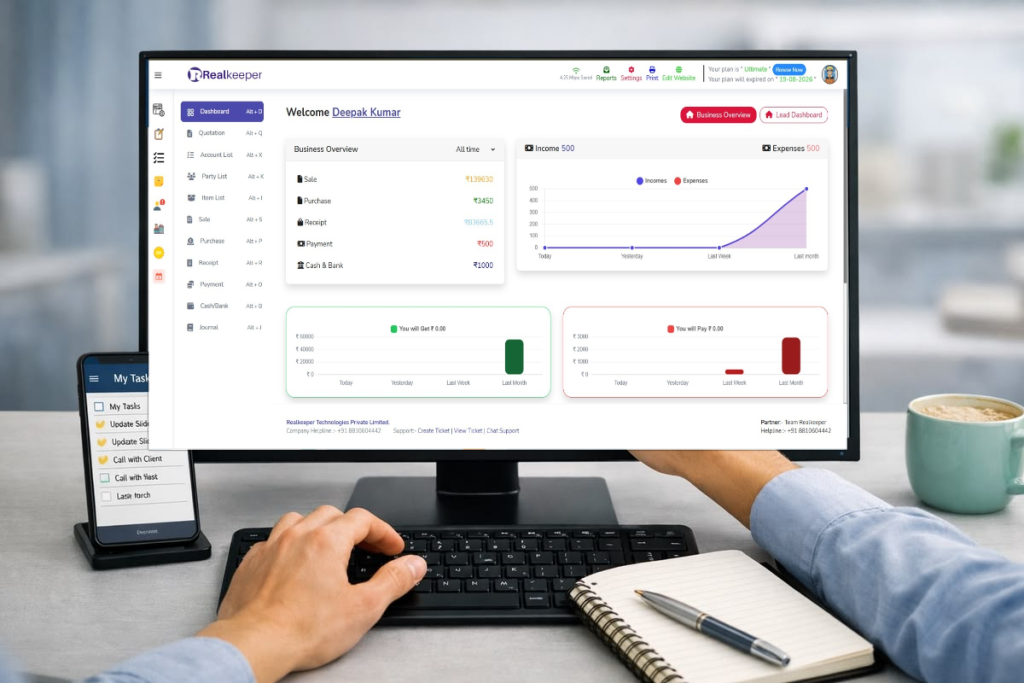
Your productivity software can show a dashboard of task activity.
Dashboards and status indicators can assist the team in identifying:
- Pending tasks
- Completed work
- Overdue activities
- Current priorities
- Assigned responsibilities
Areas where work may be delayed
With more clarity, managers can make decisions based on the current flow of work rather than information that employees need to report to managers.
6. Helps Businesses Save Valuable Time
Time is a valuable business resource. Employees waste time by searching for information, following up and reminding themselves of deadlines, updating spreadsheets, and more.
A single productivity system may alleviate some of the inefficiencies by combining related information and effort.
This way, instead of searching around the team to see what needs to be done, it could be checked using a task dashboard/reminder system, etc.
The amount of time it will actually save will vary by business, software choice, and how well your team uses it. The key benefit is a more structured workflow.
7. Supports Better Deadline Management
Missed deadlines impact customer service, business efficiency, and the delivery of projects.
Get help with deadlines, days remaining, and notifications using tools such as due dates, reminders, calendars, and notifications.
In addition to an employee’s everyday tasks, employees can also be reminded of their routine tasks on a regular basis.
This can be especially useful for activities such as:
- Customer follow-ups
- Invoice processing
- Internal approvals
- Regular reporting
- Project milestones
- Recurring administrative tasks
By making responsibilities and deadlines known, employees are more aware of the things to do and the deadlines to remember.
8. Keeps Business Information More Organized
Businesses generate a large amount of information every day.
Meeting notes, customer requirements, task details, project updates, reminders, and internal instructions can become difficult to manage when they are stored across different locations.
Some productivity platforms include digital notes, shared information, task descriptions, or centralized dashboards.
Keeping relevant information closer to the associated task can make it easier for employees to find what they need.
However, businesses should also consider access permissions, data security, backups, and information-management practices when selecting software. The NIST Cybersecurity Framework provides guidance to organizations that are reviewing their cybersecurity practice.
9. Makes Business Processes Easier to Track
Productivity software can also support process tracking.
Instead of just noting that a task exists, a business can track its life from task assignment through completion.
For example:
Assigned → In Progress → Pending Review → Completed
This kind of workflow brings responsibilities to the forefront and can assist managers in pinpointing bottlenecks.
Additional visibility can be achieved through reports and dashboards that can show task completion, remaining work, and any other available productivity information.
This allows companies to evaluate their operations and identify areas for improvement.
10. Supports Business Growth and Scalability
What’s easy for a small team working with just two of you might get out of hand once your team expands.
With business growth, more employees, more customers, more projects, and more activities present themselves, making the informal management of tasks more difficult.
A little more structure: productivity software can offer more structured solutions for managing increased workloads.
User roles, task ownership, shared dashboards, workflow tracking, and centralized information are some of the features that can help your company establish repeatable processes.
The software alone does not make the business grow. Rather, it can be the tool that gives teams the infrastructure to deal with the growth of operational complexity.
What to Expect from Reliable Productivity Software
Before selecting the productivity software, companies must ask themselves if these features match their actual workflow.
Possible features are:
| Feature | Why It Matters |
|---|---|
| Task Management | Helps create, assign, prioritize, and track work |
| Deadlines & Reminders | Helps teams manage important due dates |
| Team Collaboration | Keeps employees aligned around shared work |
| Dashboards | Provides an overview of tasks and progress |
| Reporting | Helps review available workflow and productivity data |
| Automation | Reduces repetitive administrative activities |
| Notes | Keeps important information organized |
| User Roles | Helps manage access and responsibilities |
| Integrations | Connects productivity workflows with other systems |
| Cloud Access | Allows access from supported devices and locations |
Not all features are required by all businesses. The ideal selection of features of mix will vary based on team size, business requirements, budget, and complexity of workflow.
Productivity Software vs. Traditional Work Management
Working without dedicated productivity software for businesses is possible, although it may become more difficult to sustain as the business expands. The quick brown fox jumps
| Area | Traditional Methods | Productivity Software |
|---|---|---|
| Task Tracking | Spreadsheets, notebooks, emails | Centralized task management |
| Reminders | Manual follow-ups | Digital reminders and notifications |
| Team Visibility | Depends on updates | Shared status and dashboards |
| Progress Tracking | Often manual | Structured status tracking |
| Information | Spread across multiple places | More centralized |
| Reporting | Manual preparation | Available through supported reporting features |
| Scalability | Can become difficult with growth | Designed to structure larger workflows |
While choosing which is best can depend on the business, a very small process can be handled with a simple spreadsheet, whereas a larger business with several teams may need a more integrated solution.
Real Keeper as a Business Productivity Solution
If you need performance capabilities and essential business features, then the larger business-management Real Keeper is right for you.
Personal and team to-do lists; task assignment and deadlines; digital notes; user roles, deadlines and reminders; status report of tasks; work dashboard; recurring reminders; productivity report
It also has business modules like GST billing, accounting, inventory, CRM, manufacturing, payroll, WhatsApp-related functionality, and financial reporting in its wider platform.
This is important so it can be suitable for corporations that desire production and operational control within a connected business platform as opposed to completely separate applications for each feature.
For example, a business can take advantage of task management for any internal task while handling the rest of its billing, accounting, inventory, CRM, or other functions within the broader platform.
RealKeeper vs. a Standalone Productivity Tool
| Requirement | Standalone Productivity Tool | RealKeeper |
|---|---|---|
| Task Management | Usually available | Available |
| To-Do Lists | Usually available | Personal and team to-dos |
| Deadlines & Reminders | Common feature | Available |
| Task Status Tracking | Common feature | Available |
| Productivity Dashboards | Depends on software | Available |
| Productivity Reports | Depends on software | Available |
| Accounting | Usually separate | Available |
| GST Billing | Usually separate | Available |
| Inventory | Usually separate | Available |
| CRM | Depends on software | Available |
| Manufacturing | Usually separate | Available |
| Payroll & HR | Depends on software | Available |
Real Keeper is an online platform with a range of functions that include cloud ERP for billing, accounting, inventory, manufacturing, CRM, payroll, and other business activities.
Note: This comparison is based on specifications found on Real Keeper’s website. Users should double-check the up-to-date plan, feature availability, integrations, and pricing before buying.
How to Choose the Right Productivity Software
Begin your search for productivity software with the needs of your company and not the options that get you the most features. The quick brown fox jumps over the
1. Identify Your Main Problems
First, determine what you want to improve.
Does your team find it difficult to manage tasks, deadlines, collaborate, report on, follow up with the customer, or automate processes? Hare Krishna Shyam Radha
2. List Essential Features
Draft a checklist of essential features before comparing software.
For instance, a smaller business will mostly require task management and reminders, as a business expanding might require workflow management, reporting, CRM, accounting, and other integrations to services.
3. Consider Ease of Use
If employees find the software hard to navigate, the value of that software is probably overestimated.
Look for a clean interface, comprehensible workflows, and suitable onboarding or tutorials.
4. Check Integrations and Compatibility
Make sure the software can work with your current app if you want to use other applications.
5. Think About Scalability
Opt for a tool that can scale with your business as your team, workload, and needs grow.
6. Review Security and Access Controls
Business software might have sensitive information about business operations or finances. Look into security features, user access, backups, and how data is handled before rolling out. The quick brown
Common Mistakes Businesses Should Avoid
Here are a few traps your business can fall into when choosing productivity software.
Too many features selected: More features are not necessarily better.
Forgetting employee adoption: The system is only useful if staff understand and consistently use the system.
Workflows not defined: Product should reinforce a clear process that is being implemented, not just digitizing a bad process.
Avoiding integrations: Multiple non-interacting systems may lead to constant manual input into one another.
Price only? Focus on what you will need: usability, necessary features, technical support, scalability, and value for money.
Frequently Asked Questions
1. What is productivity software?
Productivity software is an application or a platform that can be used by businesses and individuals to efficiently plan, organize, and execute tasks, collaborate with others, track progress, and more.
2. What are the advantages of productivity software?
Typical advantages include: More organized workloads, smooth teamwork, Easier scheduling and management of deadlines, Visibility into workflow, more consistent work, and more streamlined business processes.
3. Can I use productivity software?
Yes. Productivity software can help small companies keep track of tasks, delegate, assign deadlines, and establish repeatable procedures. What software makes the most sense will vary based on the size and needs of the company.
4. What features should productivity software have?
Practical features comprise plan management, deadlines, pointers, collaboration, dashboards, reporting, automation, notes, individual positions, integrations, and cloud access.
5. Can productivity software automate repetitive tasks?
Certain platforms also offer automation, default tasks, automatic reminders, and notifications. The automation features are different from one piece of software to another. Radha radha
6. Does productivity software replace project management?
No. Some productivity platforms offer project-management tools in addition to general productivity features, while others are limited to focus entirely on individual or team productivity. Different software may suit different project or workflow needs.
7. What are the tips to purchase the right productivity software?
Identify your business problems and must-haves first. Then compare features, ease of use, integrations, security, scalability, support, and total cost. Nj
8. Is it possible for productivity software to be used for accounting and business management?
Other platforms integrate a set of productivity tools with a wider business-management offering. Real Keeper, for instance, records productivity software in a list with billing, accounting, inventory, CRM, manufacturing, payroll, and reporting.
Conclusion
Using the appropriate productivity software can help organizations streamline their processes, make team tasks more visible, synchronize efforts, meet deadlines, and eliminate excess manual labor.
But software alone won’t make people more productive. A business still needs processes, ownership, user adoption, and consistent workflow.
Some organizations may feel that just task and project management alone will be enough, in which case a productivity-specific app could be all that’s needed. For those who want to tie productivity to the rest of their business, an all-in-one business-management app such as Real Keeper might be the right choice.
The hardest part is to define what your real problems are first and then select a software solution that addresses those issues without becoming another problem.


